In today’s technologically driven world, businesses have shifted from traditional brick-and-mortar stores to online platforms. E-commerce has experienced a significant boom in recent years, largely due to this digital transformation. One of the critical factors for the success of e-commerce businesses is the effective utilization of various information technologies.
Pacheco Information Technologies (PIT) is a leading provider of cutting-edge e-commerce solutions that help businesses unleash their potential and achieve success in the highly competitive online marketplace. This article is a comprehensive guide on how to take advantage of the innovative PIT tools and strategies for your e-commerce business.
To ensure the success of your e-commerce business, it is crucial to understand and leverage the key components that drive success.
1.1 User Experience (UX)
Creating an intuitive and seamless user experience (UX) is essential, as it influences how customers perceive and interact with your online store. A positive UX impacts customer satisfaction, engagement, and conversions.
1.2 Website Performance
Website performance significantly affects customer satisfaction and conversion rates. Fast loading times, optimized images, and responsive web pages are crucial for maintaining a high-performance website that enhances the user experience.
1.3 Security and Privacy
Customers value their data privacy and expect secure transactions. Implementing robust security measures ensures the protection of sensitive customer information and builds consumers’ trust in your online store.
1.4 Marketing and SEO
Effective marketing and search engine optimization (SEO) techniques help you drive relevant, targeted traffic to your store. Optimizing your website for search engines improves its visibility and increases the chances of attracting potential customers.
1.5 Customer Support
Providing exceptional customer support is vital, as it helps build strong relationships with your customers. Prompt assistance and effective communication enhance customer satisfaction and foster brand loyalty.
Advantages of Pacheco Information Technologies
Utilizing PIT’s wide range of e-commerce solutions brings numerous benefits to your online business.
2.1 Customizable Solutions
PIT offers tailored solutions to fit your unique e-commerce requirements. Customizable tools and services allow for the seamless integration of essential features and functionalities to meet your specific business needs.
2.2 Scalability
PIT’s scalable solutions enable your business to grow with ease. Its robust infrastructure supports the evolving demands of your online store, ensuring that your website remains up-to-date and efficient.
2.3 Comprehensive Support
Pacheco Information Technologies provides comprehensive support to its clients. The expert team at PIT assists you with implementing its solutions and minimizes potential challenges, enabling you to focus on growing your business.
2.4 Cutting-edge Technology
PIT leverages the latest technology to deliver innovative and secure e-commerce solutions that enhance your online store’s functionality and customer experience.
Implementing PIT Solutions for E-commerce
Successfully implementing PIT solutions for your e-commerce business involves several steps.
3.1 Analyzing Business Requirements
The first step involves understanding your online store’s unique challenges and requirements to determine the optimal PIT solutions.
3.2 Developing an Implementation Plan
Create a comprehensive plan outlining the steps required for implementing PIT solutions. Estimating the resources, timelines, and potential challenges allows for a smooth and efficient transition.
3.3 Training and Support
Ensure that your team is well-trained to leverage the full potential of PIT’s e-commerce solutions effectively. PIT’s support team is available to assist with any difficulties that may arise.
3.4 Ongoing Monitoring and Updates
Regularly monitor your e-commerce website’s performance, security, and functionality. Stay up-to-date with the latest technology and industry trends to ensure your online store remains relevant and competitive.
Top PIT Tools and Services for E-commerce Success
Pacheco Information Technologies offers a variety of e-commerce tools and services designed to empower your online store and drive success.
4.1 PIT E-commerce Platform
An all-inclusive e-commerce platform that provides a comprehensive suite of features and capabilities to power your online store. It includes a user-friendly content management system (CMS), secure payment gateway integrations, and robust performance optimization tools.
4.2 PIT SEO and Marketing Services
PIT’s SEO and marketing services help you drive targeted traffic to your online store, generate leads, and boost conversions. The expert team at PIT provides customized SEO strategies, tailored advertising campaigns, and engaging social media content to help you grow your online presence and attract more customers.
4.3 PIT Customer Support Solutions
A robust customer support solution that enables you to effectively manage and respond to customer inquiries. The PIT Customer Support Solutions include live chat integration, seamless ticketing systems, and a knowledge base to ensure your customers receive outstanding service and support.
4.4 PIT Analytics and Reporting
PIT’s analytics and reporting tools provide insights into your online store’s performance, customer behavior, and conversion rates. These data-driven insights help you make informed decisions to optimize your e-commerce strategy and further enhance your online store.
Achieving Results with PIT
Implementing Pacheco Information Technologies can significantly improve your e-commerce business’s performance and results. Its cutting-edge e-commerce solutions provide a comprehensive foundation to support and drive your online store’s success.
With an optimized website, increased visibility, and improved customer experience, you can expect a boost in conversions, customer satisfaction, and revenue. By leveraging the full potential of PIT, you can set your e-commerce business on the path to success.
Amazon Pacheco is a powerful software suite designed to help Amazon retailers streamline their operations and maximize profits. This all-in-one toolset provides users with invaluable tools for managing inventory, advertising, sales analytics, and more. With so many features available, it can be challenging to master all its potential fully. In this article, we will guide you through the different aspects of Amazon Pacheco, giving you tips on how to use this platform to its fullest, improve productivity and boost your Amazon business’s success.
Before diving into the specific functionalities, it’s essential to have a solid understanding of Amazon Pacheco itself. Most e-commerce businesses use Amazon Pacheco to manage their entire online operation, such as:
Inventory management
Advertising campaigns
Sales reports and analytics
Repricing strategies
Review monitoring
Amazon Pacheco has become an indispensable tool for many online retailers, assisting them in growing and thriving on the competitive Amazon marketplace.
Inventory Management
Managing inventory is one of the most critical aspects of a successful Amazon business. Amazon Pacheco offers a robust inventory management system to help ensure you can keep track of your stock levels accurately and avoid overselling or stockouts. The following are some tips for inventory management using Amazon Pacheco:
1. Monitor Stock Levels
Regularly check your inventory levels and track items with a low stock threshold. Set up automatic notifications to alert you when an item’s stock reaches a predefined level, allowing you to act accordingly and prevent stockouts.
2. Integrate with Other Platforms
If you sell on multiple marketplaces or platforms, consider using Amazon Pacheco’s multi-channel inventory management feature. This feature synchronizes your inventory across various channels, simplifying your management process and ensuring accurate stock levels.
Advertising Strategies
Advertising is another vital aspect of a successful Amazon business. Here are some tips for leveraging Amazon Pacheco’s advertising tools:
1. Get Started with Sponsored Products
Amazon Pacheco offers Sponsored Products advertising, which allows you to promote your products to a broader audience. Use this feature to increase your products’ visibility, leading to more sales and higher search rankings.
2. Experiment with Different Targeting Options
Amazon Pacheco offers a variety of targeting options for advertising campaigns. Test different targeting types, such as keyword targeting, product targeting, and category targeting, to find the best approach for your products and budget.
3. Analyze Advertising Data
Track your advertising campaigns’ performance using Amazon Pacheco’s in-depth analytics. Evaluate metrics such as impressions, clicks, and conversion rates to determine your campaigns’ effectiveness and make data-driven decisions to optimize your ads.
Analytics & Insights
Amazon Pacheco provides comprehensive analytics to monitor your business’s performance. Use this data to identify trends, pinpoint areas for improvement, and develop data-driven strategies to increase profitability. Here are some tips for using analytics effectively:
1. Analyze Sales Data
Examine sales data to identify patterns and trends in your performance. This information can help you to plan purchasing decisions, identify top-selling products, and maximize inventory turnover.
2. Monitor Performance Metrics
Track essential performance metrics such as conversion rates, sell-through rates, and return on investment (ROI). Use this data to identify areas where your business could improve and implement strategies to enhance your overall performance.
Customer Reviews
Customer reviews play a critical role in your Amazon business’s success. Positive reviews can influence purchasing decisions and increase your credibility as a seller. Amazon Pacheco offers tools to help you monitor and manage customer reviews. Here are some strategies:
1. Respond to Negative Reviews
Address negative reviews promptly and professionally, attempting to resolve the issue and demonstrating your commitment to customer satisfaction. A well-handled negative review can build trust and credibility with potential buyers.
2. Encourage Positive Reviews
Ensure excellent customer service and fast shipping to increase the likelihood of receiving positive reviews. Offer incentives, such as discounts or promotional codes, for customers who share their product experiences in reviews.
Automated Repricing
Prices on the Amazon marketplace are extremely competitive. To stay ahead, it’s crucial to ensure your products are competitively priced at all times. Amazon Pacheco’s automated repricing feature enables you to automatically adjust your product prices based on market conditions, competitor pricing, and your desired profit margins. Here’s how to make the most of automated repricing:
1. Set Repricing Rules
Create custom repricing rules based on factors such as product cost, desired profit margin, and product category. This ensures that your repricing strategy aligns with your overall business goals.
2. Monitor Repricing Performance
Track the performance of your repricing strategies and make adjustments as necessary to optimize your prices and maintain competitiveness in the market.
Preventing Suspensions
Amazon has strict rules and guidelines that sellers must follow to maintain their accounts in good standing. Failing to adhere can lead to account suspension or termination. Here are some tips for staying compliant with Amazon’s policies when using Amazon Pacheco:
1. Stay Informed of Amazon’s Policies
Keep up to date with Amazon’s seller policies and guidelines. This ensures that you’re aware of any changes and can adjust your processes accordingly to maintain compliance.
2. Monitor Your Account Health
Monitor your Amazon Seller Central dashboard to track your account’s health, such as order defect rate, late shipping rate, and cancellation rate. Ensure that you maintain good standings in all performance metrics to avoid potential suspensions.
Final Thoughts
Mastering Amazon Pacheco can be an invaluable asset for your Amazon business. By leveraging its powerful suite of tools and features, you can streamline your operations, increase efficiency, and ultimately, boost your profits. Utilize the tips provided in this article to make the most of Amazon Pacheco and take your Amazon business to new heights.
Amazon’s Net Pure Profit Margin (Net PPM) is an essential key performance indicator (KPI) for Amazon Vendors.
What is Net PPM?
Net PPM reflects the product profitability after expenses like the cost of goods, vendor funding (co-op activities), and sales discounts. Per Amazon, the metric will;
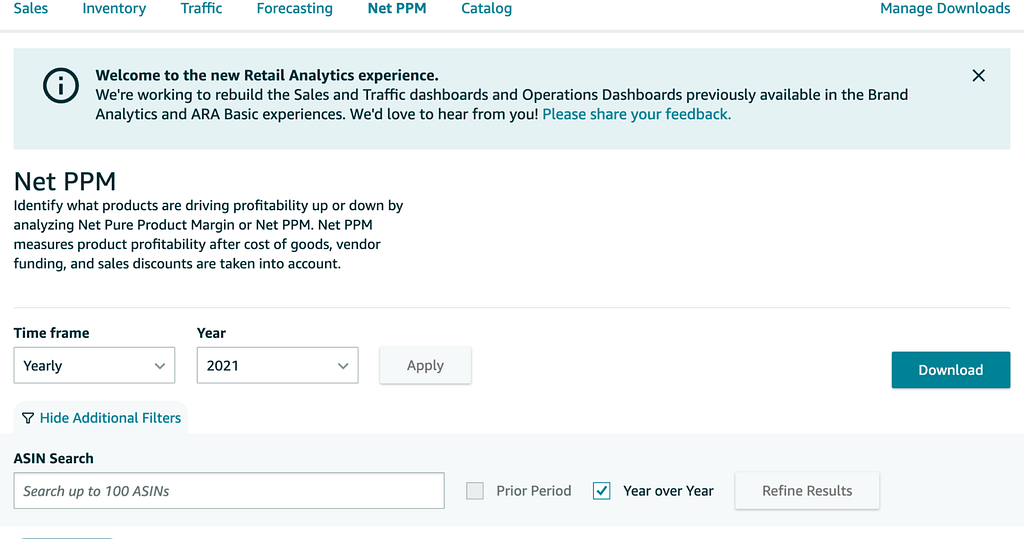
“identify what products are driving profitability up or down by analyzing Net Pure Product Margin or Net PPM. Net PPM measures product profitability after the cost of goods, vendor funding, and sales discounts are considered.”
The good news? No need to worry about calculating your Vendor Net PPM; Amazon offers data to analyze this metric as part of a collection of Amazon Retail Analytics reports.
How about some more good news? The metric is part of a more extensive collection of ARA reports. The reports include data for glance views, margins, sales performance, and many others. The metrics in the ARA support deep dives into sales diagnostics, the financial health of your vendor account, trending product sales, and insight into products that can be optimized.
ARA reports are available for Vendors in North America, Europe, and APAC.
Why is Net PPM crucial for your business?
Amazon Net PPM provides insight into whether a product generates enough profit from its sales, providing clues that help ensure operating and overhead costs are contained.
While companies use Net PPM to assess operational profitability performance, the metric can also impact other aspects of an Amazon business. For example, poor performance can;
affect your ability to sell products through Amazon Advertising because you cannot continue supporting your marketing campaign with paid media.
impact future Amazon purchase orders due to “Amazon Can’t Realize a Profit (CRaP).”
cause Amazon to concede the buy box to competitors.
Amazon automatically provides a Net PPM in reports. As a result, there is no need to invest the effort to calculate it yourself. However, it can be helpful to understand how it is calculated so you can make informed decisions to optimize your Vendor operations.
As we have stated previously, Net PPM measures the profitability (profit/cost) of an item sold through Amazon.com.
Amazon calculates ASIN level Net PPM based on the following formula:
Average Selling Price - Cost Price + Vendor Negotiated Contract Terms) / Average Selling Price
Note that your Vendor terms, at the account level, will impact your performance, so ensure you negotiate favorable terms to maximize your opportunity for profit.
A sales discount is deducted from your margin when a customer receives a discount. A discount may be promo code redemptions, lightning deals, and similar. Amazon includes these sales discounts as part of the Net PPM in Vendor Central. Also, note that the Net PPM metric Amazon shares does not factor spending on Amazon Advertising, any chargebacks, or specific costs related to payment terms.
Where Can I Find Net PPM in Amazon Vendor Central?
Amazon offers two primary methods to access Net PPM data in Vendor Central. The first method is manual reporting downloads, and the second is Amazon API automation software.
Manual Downloads: Log into your Vendor Central account and download the report.
Automation: Ensures your team can skip the manual data wrangling and take control of your Inventory data and store it in a private data lake or cloud warehouses such as Snowflake, BigQuery, Amazon Athena, Redshift, and Azure Data Lake. Your team can then leverage best-in-class analytics and business tools like Tableau Looker, Power BI, and Google Data Studio to fuel Amazon analytics via custom reports, interactive graphs, and sales dashboards.
Manual Download Net PPM Reports
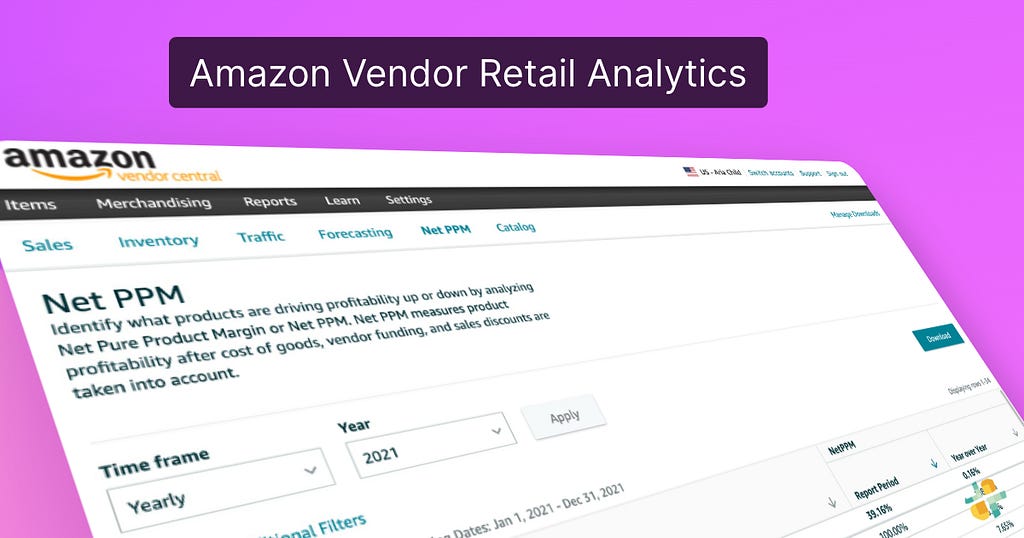
The first method we mentioned is a downloaded report file available on the account interface. Select “Reports” and “Retail Analytics. “There will be a report listed called “Net PPM” similar to the screen below:
What is the downside of manual report downloads? Someone logging in daily, downloading reports, and manually tracking 100s of report files needs to scale better. This approach can result in time-consuming and error-prone work, especially if you need consistent access.
Amazon Vendor Central Software Automation For Reports
Amazon Vendor Central software is an essential data automation tool. The Vendor Central API provides official, direct access to your data.
Suppose you are an individual Vendor, a large brand, an agency, or an FBA acquisition company. In that case, API automation provides various features, including the ability to perform code-free, fully automated Net PPM reporting data feeds to a data lake or cloud data warehouse.
Automation will automatically generate reports, process, route, and load to your private data destination so you can manage and optimize your sales and inventory. Automation also supports other Vendor Retail Analytic reports for which items are selling best, sales history, glance views, and other Amazon Vendor Central reports.
Vendors also have direct API access to Amazon Advertising (Sponsored Ads, DSP, Attribution) performance data.
Tools For Amazon Automation
No more manual data wrangling. With data unified and accessible, quickly optimize for poor conversion rates, identify gaps in operational performance, uncover the percentage of customers converting, or refine advertising efforts on and off Amazon.
Data automation unlocks the ability to use BI tools that can spot trends and adjust your business in response to changing market conditions.
Rather than a mess of file downloads, automation will unify your data to a leading data lake or cloud warehouses like Databricks, Redshift, Redshift Spectrum, Google BigQuery, Snowflake, Azure Data Lake, Ahana, and Amazon Athena for a unified, analytics-ready single source of truth to fuel informed decisions on product, media, and customer demand.
Unified data opens new opportunities for Vendor analytics. For example, for self-service reporting and insights, you can use your Google Data Studio, Tableau, Microsoft Power BI, Looker, Amazon Quicksight, or many others.
Get Started — For Free
Ditch manual report file downloads! Openbridge offers direct, code-free, and fully-automated access to Amazon Net PPM data. Our Amazon automation gets you the data you need to accelerate your Vendor Central business.
Frequency Asked Questions
Does Amazon’s Net Pure Profit Margin reflect the financial health of my Vendor business with Amazon?
Yes, it can. However, it should not be viewed in isolation from other product and account metrics.
Is there an API for Vendors?
Yes, the Amazon Selling Partner API and Amazon Advertising API provide direct, official access to Vendor sales performance, inventory, net pure profit margin, purchase order, and other report metrics. The API supports yearly, daily, and weekly reporting periods.
Amazon brand analytics, sales diagnostics, amazon search terms report, Glance Views, and other report automation is available, saving your team from manual file downloads.
Rather than manually dealing with a single report and export a comma-separated report each day, the API supports fast, code-free access via Openbridge Amazon Vendor Central software.
Does my brand need to enroll in Amazon Brand Registry?
Yes, your brand should be enrolled in the Amazon brand registry. Not only does this protect your brand, but your Vendor account will also be able to access Brand Analytics reporting.
Automating Amazon Vendor Central Net PPM Reporting was originally published in Openbridge on Medium, where people are continuing the conversation by highlighting and responding to this story.
Amazon sellers are typically surrounded by a variety of queries, ranging from broad ones like “what is the difference between Amazon Seller Central and Amazon Vendor Central?” to more specific niche questions like “what does Fulfilled by Amazon (FBA) mean?”. While both programs are designed to help businesses sell on Amazon, they have different features, benefits, and requirements. In this blog, we will deep dive into both Seller & Vendor Central platforms and try to answer all your queries.
What is Amazon Seller Central?
It is a platform often used by brands & merchants to establish a brand connection with customers on Amazon. As a third-party (3P) seller, you can sell, manage, ship, and optimize client orders on your own by signing up for an account on Amazon Seller Central.
How to become an Amazon Seller?
Amazon Seller Central offers Individual Plans & Professional Plans under its umbrella. With the individual plan, there is a starting price of $0.99 for each item sold, while for the professional plan, there is a monthly minimum of $39.99.
Learn more about the features offered under the plans,
When it comes to fulfilling customer orders, sellers can either manually handle all the shipments, customer service, and returns-related tasks or leverage a third-party logistics (3PL) provider. The latter is commonly referred to as Fulfilled by Merchant (FBM). As a 3P seller, Amazon also provides you with the option to give all fulfillment-related tasks to Amazon. Your orders will then be taken care of by Amazon, and customers will see the tag: “Sold by Seller (Brand) XYZ and Fulfilled by Amazon’ on the product detail page. This type of partnership falls under the Fulfilled by Amazon (FBA) program and the entire logistics-related aspects are taken care of by Amazon.
The Amazon Fulfillment Fees vary for different products based on their Size Range, Dimension, and Per Unit Weight. For example, the fulfillment fee for a T-shirt in the “Large Standard Size” tier with measurements of 14″x10″x0.76″ and a unit weight of 12.32 oz is $5.32.
You can find out more about the estimate for your FBA fees here.
Benefits of Amazon Seller Central
Amazon Seller Central is best suited for businesses that want to manage their own inventory, set their own prices, and have control over their marketing and order management.
What is Amazon Vendor Central?
Contrary to Amazon Seller Central, it is most commonly used by distributors and manufacturers. Sellers registered under Amazon Vendor Central are referred to as First-party (1P) sellers. You can operate as a supplier and sell your goods in bulk to Amazon as a 1P seller, but you can only sign up for the Amazon Vendor Central platform by invitation. The Amazon Vendor team contacts any potential vendors they think would be a good fit for the Vendor Central Platform.
The customers will see your product tagged as ‘Sold and Fulfilled by Amazon’ on the order detail page.
How to become an Amazon Vendor?
Not everyone can access Amazon Vendor Central, seller’s eligibility is determined using certain selection criteria and algorithms. Consistently high traffic and your brand’s strong sales volume are some of those selection criteria. Amazon will only deem you fit as a potential seller if they notice that your brand is well-known, has a good conversion rate, and generates a lot of purchase orders. Seller Central might be the best platform for new Amazon sellers to start, while Vendor Central can be used when they have established themselves as a viable option in the market. The process of becoming a vendor typically begins with an email from Amazon, saying that they are interested in selling your products. After accepting the initial email they will explain how Vendor Central works and provide you with their terms & conditions for becoming a vendor.
Benefits of Amazon Vendor Central
Amazon Vendor Central is best suited for manufacturers and distributors who want to sell their products in bulk to Amazon and have Amazon manage the orders, pricing, and marketing.
Difference between Amazon Seller Central & Amazon Vendor Central
The main distinction between both programs can be made using the following points:
E-commerce fulfillment Models used by Amazon?
As an e-commerce giant, Amazon uses these models in order to manage and deliver customer orders properly and timely.
These four types of ecommerce fulfillment models are available in the marketplace:
How can DataChannel help you with Amazon Seller & Vendor Central data?
Merchants should use DataChannel to access their Amazon Seller/ Vendor Central data as it provides a secure, reliable, and efficient way to manage and transfer their data into a single source of truth. The multiple advantages of having your Amazon Seller or Vendor data in a centralized data warehouse are:
Overall, DataChannel provides a powerful solution for all types of enterprises looking to access and manage their Amazon Seller and Vendor Central data. Also, DataChannel can help provide sellers a more flexible and customizable solution that ensures data quality & scalability when it comes to managing and analyzing data. If you have any questions regarding our integration with Amazon Seller/ Vendor Central API, reach out to us here or schedule a demo call today.
Simplify manual and tiresome tasks of Amazon Vendor Central efficiently and at one go. Give rise to your sales and attract more customers in a smart way.
As we enter the digital era, technology plays an increasingly important role in shaping businesses’ success. Pacheco Information Technologies (PIT) has emerged as an industry leader, offering a range of solutions and services to help companies navigate the rapidly evolving digital landscape. In this comprehensive guide, we will take a closer look at PIT’s offerings and discuss the factors behind its outstanding reputation in the market.
Pacheco Information Technologies was founded in 2005 with a mission to provide the essential services and support needed for businesses to unlock their potential in the digital era. Since its inception, PIT has grown to become an industry leader, helping countless companies leverage technology effectively to drive their growth and success.
Services Offered by PIT
PIT offers a comprehensive range of services designed to cater to the unique needs of its clients. Their diverse portfolio includes consulting services, IT solutions, digital marketing strategies, and training and support. Let’s explore these offerings in detail:
Consulting Services
At the heart of PIT’s service offerings lie their consulting services. PIT’s team of experts works closely with clients to understand their unique challenges and opportunities, devising tailored strategies and recommendations designed to help clients make the most of today’s cutting-edge technology.
Strategic Planning: PIT helps clients develop a clear vision for their digital future, defining achievable goals and establishing the necessary steps to reach them.
IT Roadmapping: PIT assists companies in creating an IT roadmap that aligns with their business objectives, ensuring a seamless transition to new systems and technologies.
IT Auditing: PIT offers comprehensive IT audits that identify potential risks and vulnerabilities in clients’ systems, helping them implement proactive measures to prevent breaches and data loss.
IT Solutions
Pacheco Information Technologies offers a suite of IT solutions designed to streamline clients’ operations, improve efficiency, and support growth. These solutions include:
Software Development: Custom software development tailored to clients’ unique requirements, including mobile apps, web platforms, and enterprise systems.
Cloud Services: PIT helps clients migrate to the cloud, leveraging its immense potential for scalability, cost-effectiveness, and enhanced security.
Data Analysis and Visualization: PIT offers advanced data analysis and visualization tools that empower businesses to harness their data and make data-driven decisions.
Digital Marketing
Understanding the importance of a strong online presence, PIT provides a range of digital marketing solutions to help businesses reach their target audiences and grow their brands:
Search Engine Optimization (SEO): Ensuring clients’ websites rank highly on search engine results pages (SERPs) to drive organic traffic.
Social Media Marketing: Developing and implementing effective social media strategies to engage with customers and increase brand awareness.
Content Marketing: Creating and distributing high-quality content that resonates with target audiences, generates leads, and converts prospects into customers.
Training and Support
Rounding out PIT’s service offerings is their commitment to providing comprehensive training and support for their clients:
Training Programs
Description
IT Skills Training
PIT offers a range of IT skills training programs to empower clients’ employees with the necessary technical expertise to succeed in today’s digital landscape.
Leadership Training
PIT provides leadership training aimed at helping clients’ manage their teams more effectively, fostering a culture of collaboration and innovation.
Customer Service Training
High quality customer service training programs that help clients’ staff to provide exceptional support and service to customers, ultimately driving customer satisfaction and loyalty.
Why PIT Stands Out as Industry Leaders
There are several factors that have contributed to PIT’s success as industry leaders in the digital era:
Proven Experience
With over 15 years of experience in providing high-quality technological solutions and services, PIT has an unparalleled track record of success. Their extensive industry knowledge enables them to offer innovative solutions that cater specifically to clients’ needs.
Commitment to Innovation
PIT’s commitment to staying ahead of the curve means its clients benefit from cutting-edge solutions that enable them to outperform their competitors. By constantly exploring new developments in the rapidly evolving tech landscape, PIT ensures that it offers the best-in-class tools and strategies for businesses to succeed.
Exceptional Customer Service
PIT understands the importance of exceptional customer service in driving satisfaction and loyalty. By offering round-the-clock support and personalized attention, PIT ensures that clients’ needs are met and expectations exceeded.
Conclusion
In summary, Pacheco Information Technologies demonstrates an unwavering commitment to excellence that places it at the forefront of the digital services industry. By offering comprehensive solutions and services tailored to their clients’ unique needs, PIT empowers businesses to reach new heights in the digital era. With a winning combination of proven experience, a dedication to innovation, and exceptional customer service, PIT is the go-to partner for businesses seeking to unlock success in the digital age.
How to use Amazon Vendor Central, optimize sales performance, and become a data-driven retailer.
Optimizing your e-commerce sales can be challenging for a brand or business owner. From establishing an Amazon store to leveraging Amazon Advertising products like Sponsored products or Sponsored brands, reaching Amazon customers is critical to success.
This Amazon Vendor Central FAQ covers various performance reports in your Vendor Central account, business metrics, definitions, and areas of opportunity as you optimize sales and operational performance.
What is Amazon Retail Analytics?
Amazon Retail Analytics (ARA) provides reports that let an Amazon Vendor analyze sales and operational data, such as revenue and inventory levels.
All vendors have access to ARA, including manufacturers and authorized resellers.
Amazon Brand Analytics (ABA) is a set of reports that lets you analyze your customers’ buying and search behavior. To access ABA, you must be enrolled in Brand Registry and be responsible for selling the brand in the Amazon store. Brand Registry enrollment is not required for ARA.
You can access ARA and ABA through the Reports menu in your account or the Selling Partner API (see Unlocking Amazon Vendor Central Data With New API) for automation and data unification.
What are Vendor Retail Analytics Reports?
Vendors have access to performance data they need to manage and grow their business with Amazon Retail. Through vendor-specific dashboards, reports, or API, you can monitor your retail KPIs, evaluate your performance, identify operational improvement opportunities, and glean valuable insights to shape your business strategy.
What types of ARA Reports are available?
A collection of specific report types available; Sales, Traffic, Net Pure Product Margin (PPM), Inventory, Catalog, and Forecasting. The Traffic, Net Pure Product Margin (PPM), and Forecasting dashboards are only displayed to manufacturers.
As mentioned earlier, Reports are available via the Vendor Central interface, downloads, or API. See Secret To Unlocking Amazon Vendor Central Reports
Do I have to download Reports manually? Is Vendor Reporting Automation supported?
Automation will automatically generate reports, process, route, and load to your private data destination so you can manage and optimize your sales and inventory. This is accomplished via the Selling Partner API for Vendors.
What are the benefits of Vendor Report Automation?
You can unify your Vendor data to a leading data lake or cloud warehouses like Databricks, Redshift, Redshift Spectrum, Google BigQuery, Snowflake, Azure Data Lake, Ahana, and Amazon Athena for a unified, analytics-ready single source of truth to fuel informed decisions for Vendor insights.
Automated, unified data unlocks the ability to use tools like Google Data Studio, Tableau, Microsoft Power BI, Looker, and Amazon Quicksight.
See Code-free Amazon Vendor Central Software for more information on automation opportunities.
Can I select prior reporting periods in the Amazon reporting interface?
Select Trailing in the Time frame drop-down menu to see trailing period options. Trailing period options include four weeks, 13 weeks, and 12 months. To see the prior period, select Show additional filters.
Regular period options include year-to-date, quarter-to-date, month-to-date, and week-to-date. Select Recurring in the Time frame drop-down menu to see recurring period options. To see year over year, select Show additional filters.
What is the cadence of reporting data availability?
Reports may take up to a week to populate data after a reporting period closes. Amazon targets to update all weekly reports within 72 hours and continuously improves its system to get Vendor reports out faster.
Does ARA support the Lost buy box (LBB)?
The Amazon pricing team no longer supports LBB and can’t provide an LBB metric in ARA until an effective replacement metric is available. An alternative metric, the Lost featured offer (LFO), is in development, but we need to guide when that metric is available.
Are Conversion and average sale prices derived metrics?
Yes, conversion and average sale prices (ASP) are derived metrics, meaning they can be calculated using other metrics already provided in the sales dashboard. Conversion means the number of ordered units divided by glance views. ASP means the amount of shipped revenue divided by shipped units.
Difference between the Manufacturing view and the Sourcing view
All vendors have access to Sourcing views, which will show the sales data for ASINs sourced from a vendor code in the vendor group. If you are a manufacturer, you will also have access to the Manufacturing view, which shows data for any ASIN manufactured by the Vendor, regardless of who sourced the product to Amazon.
There needs to be ASINs in the ARA dashboard. Why?
Here are a few possible reasons:
Distributor view: Make sure you’ve selected the correct distributor view. The Manufacturing view shows data for ASIN numbers you’ve made regardless of where they came from. The Sourcing View displays data of ASINs directly imported into your inventory system from suppliers’ codes in your Suppliers’ Groups.
No data in the period: A product must have data on one of the metrics in a dashboard to display in that particular DashBoard. For example, a product with stock will show in the Stock DashBoard but not in the Sales Dashboard if there were no sales for that product during the time frame specified.
ASIN mapping: Vendors can create an ASIN catalog to map to ARA. When they do so, they must also configure the ASINs to match the ARA report structure. They must wait until the dashboard reflects the changes before seeing them.
Why are there Unowned ASINs in the dashboard?
An ASIN mapping is a likely root cause. If ASINs are correctly mapped to ARA via the correct vendor hierarchies, vendor groups, and attribute setups, they may appear correctly in ARA dashboards. If you’re having trouble with ASIN mappings, contact your retailers or submit an issue through our Support Center, and Amazon will be happy to assist you.
Data does not match the data from the vendor manager or account manager.
You can use Amazon Seller Central (ASIN) level data parity between Amazon Retail Analytics (ARA) and your retailers’ internal systems to report their sales performance. If you want to know if your retailer has reported you for any issues, contact them directly or open a Contact Us request.
Why are some users able to see a particular dashboard while others can’t?
Users who aren’t admins need Financial Reports permission turned on for them to view their inventory. Admins already have all permissions turned on by default. Only an Administrator can turn off another user’s permissions.
What is the Vendor Forecasting dashboard?
The Forecasting dashboard allows you to identify the future demands for your product so you can plan for production and inventory. It doesn’t promise precisely when your potential buyers may buy your product.
What is the meaning of the different P-levels?
The forecasting tool generates forecasts for an ASIN with different levels of certainty or critical ratios (CR) or probabilities. A higher CR or probability level indicates more significant amounts of inventory. For example, if you set a CR of.80 shows an 80 percent chance that the item will be available within 30 days.
Do Vendor purchase orders match with the units forecast?
The report forecasts unconstrained customer demands, which does not guarantee future purchases. If already on-hand or on-ordered units are available to meet customer demands, these would be considered when issuing buy requests.
What is the Vendor Inventory dashboard?
The Inventory Dashboard lets you monitor the health of the products in your store by providing weekly reports. You can quickly identify any issues and take action accordingly.
What is the sellable on-hand unit calculation?
In the Inventory dashboard, sellable on-hand units refer to the product’s physical condition as recorded in our inventory before we account for any outbound units, such as customer shipments, transfers, or removals. The sellable inventory does not necessarily mean that it is available on the Amazon website, only that it is not considered defective.
Why am I unable to view inventory metrics at the daily granularity
Some inventory reports aren’t available daily, so the “Inventory Dashboard” report has been disabled.
Out-of-stock (OOS) metrics are not replenishable out of stock (Rep OOS).
ARA surfaces procurable consider both replenishable and non-replenishable products. However, Rep OOS only looks at replenishable ASINs. Since there are more replenishable ASINs than non-replenishable ones, Rep OOS has fewer opportunities to surface new non-replenishable ASIN
There are no ROOS or unfilled orders in the Sourcing view.
This is normal behavior because the data from ROOS (returns ordered online) and unfilled orders (orders not filled by the manufacturer) are only available for manufacturers. These are ASIN-level data, so they cannot be attributed to any particular manufacturer.
If the Vendor is a supplier, they will have access to the Supplier Inventory Management (SIM) views, which show ASIN-based inventory levels for each item sold by the vendor code designated in the Vendor’s SIM profile. These views are enabled by default. Retailers can disable them if needed.
What is the Net PPM dashboard?
The Net PPM dashboard identifies which products drive profitability by analyzing net pure product margin (Net PPM). See Automating Amazon Vendor Central Net PPM Reporting
How is Net PPM calculated?
Net pure product margin (PPM) is calculated as shipped revenue minus shipped PCOGS + CCOGS (cost of goods) minus sales discounts, then divided by shipped revenue.
Why is the Net PPM dashboard not visible?
The Net PPM dashboard is commonly offered only to manufacturers.
Are warehouse deals excluded from the net PPM metric?
Your retailers’ internal systems may include “warehousing” deals. Because these deals aren’t included in Brand Analytics, they’re excluded from the metric. Since the Vendor does not collect proceeds from Warehouse Deals sales, they do not account for these transactions.
What is the Vendor Sales dashboard?
The Sales Dashboards allow a Vendor to quickly identify opportunities by showing you how your team is doing against others and where they’re falling behind. The performance reports help companies improve their sales process and increase revenue. The data provides a single view of all data related to sales activities.
Do Vendors have access to Sales Dashboards?
Yes, Vendors can see their own offers’ sales reports, including the number of units sold, the total revenue generated by each offer, and the average price per unit.
Are warehouse deals excluded from sales metrics?
Your retail partner’s internal warehouse deal reporting tool may include Warehouse Deals. However, ARAs do not report Warehouse Deals in their reported metrics.
Because the Vendor does not collect revenue from warehouse deals sales, we don’t count them when calculating our gross profit margin.
If you need to know whether warehouse discounts are included in your internal metrics, contact your retailer or open a Contact Us case.
Will shoppers who return products and receive refunds are counted in shipped items and sales?
ARA accounts for customer returns and refunds in shipments and revenues. When a customer returns their product, the date they returned and canceled orders are attributed to them. Based on the original order dates, sales orders are adjusted for customer returns and cancellations.
What is the Vendor Traffic Dashboard?
The Traffic Dashboard allows you to see trends in traffic-related metrics. See How To Use Amazon’s Glance View As A Key Performance Metric.
Why can’t I see the traffic dashboard?
Suppose the Vendor is an OEM (Original Equipment Manufacturer). In that case, they will have access to their ASIN-specific views, including ASIN-specific data, such as traffic and forecast, for any ASINs they manufacture. Contact retail partners to enable these views.
How does Amazon define a glance view?
GV measures customer traffic and is defined by the number of times someone has viewed the products’ details pages.
How can brands calculate “glance views” (or “looks”)?
When using Brand Analytics reports, GVs are calculated on the ASIN-featured-seller-retailer-product-detail-viewed-by-user-session basis. We expose raw GVs for each session so that retailers can see which sessions were converted by their products.
Because the brand analytics reports show impressions, but the brand analytics metrics don’t include any impression data.
Glance metrics can vary depending on the type of report being run. For example, advertising reports track impression and click data to determine whether an advertisement effectively drove shoppers to the shelf.
However, brand analytics reports measure conversion rates to see if a campaign successfully moved customers to a product detail screen. These two types of reports may differ significantly in calculating glance metrics.
Can you use glances to calculate conversions?
Conversion is the percentage of times a glance view was converted into a sale. It is a derived metric calculated by dividing ordered revenue by glance views.
What is the Vendor Catalog dashboard?
The Catalog Dashboards let you access the latest product details for your items.
How do you access the Catalog dashboard?
This Dashboards module is available to all vendors who have access to ARA regardless if they have additional permissions. Vendors can choose between two views: the manufacturing and sourcing views. Only manufacturers will see the manufacturing tab. Retailers will not see any tabs unless they are a retailer.
Some people don’t see the manufacturing view in the catalog dashboard, while others can’t.
All users will have full access to the Sourcing View if they have access to ARA.
Only administrators can view manufacturing reports for their accounts.
Admins will already be given all permissions by default. An administrator can only grant or remove permission to another user.
What is the Catalog dashboard update frequency?
The reports will automatically refresh every time an updated ASIN attribute becomes available. You cannot manually change the report’s refresh interval.
Do Vendors have access to Amazon Advertising performance reports and data?
Amazon Vendors have direct access to their digital marketing analytics data for each Amazon Marketplace they advertise. The data can be used for Amazon SEO efforts, campaign sales diagnostic, brand lift analytics, and other performance analysis. See Amazon Vendor Central Advertising.
What is Seller and Vendor Brand Analytics?
Brand Analytics reports in-depth cover sales, marketing, operations, customer behavior, and enhanced trends to enable you to make more informed business decisions, assess your market share, identify new opportunities, and monitor factors that affect sales. See Why Amazon Brand Analytics Fuels Growth
Data is generally available in Brand Analytics within 72 hours of the close of a given period.
The key features of Brand Analytics are:
Search: See how customers (in aggregate) find your products and other products on Amazon, including each product’s relative search popularity, click share, and conversion share.
Market basket analysis: Learn what other products are bought along with your products.
Repeat purchase behavior: This shows the number of orders received for each product or brand and the unique customers who placed the orders.
Brand Analytics is located under the Reports tab. This feature is only available if you own your brand and are responsible for selling the brand on Amazon. It would help if you were internal to the brand and not a third-party company supporting it.
If you don’t have access to Brand Analytics, you have not been identified as a vendor who meets the Amazon Brand Registry criteria. You must be a brand owner for an Amazon Vendor Central ( or Amazon Seller Central) account.
Should I use the Amazon Retail Analytics API or the legacy EDI?
APIs are the preferred integration solution compared to EDI and will offer more long-term functionality. APIs have lower infrastructure and development costs relative to EDI, are easier to use, do not require specialized knowledge, and enable efficient near-real-time processing.
Benefits of the SP-API vendor retail analytics report types include:
Source data for the API reports are from the same source used by Amazon retail category teams
Data parity across API reports and Amazon Retail Analytics dashboards in Vendor Central
Enabling integrators to specify and request data from different time range aggregations, such as daily, weekly, monthly, quarterly, yearly, and trailing four weeks
Easy-to-access data backfills for historical data
Openbridge is a cloud-based Amazon Vendor Central software tool designed specifically for Amazon Sellers and Vendors. It allows you to simultaneously automate API data feeds across multiple accounts, monitor sales performance across all channels, and automate inventory management and shipping processes.
Do you need a verified Amazon Vendor Central Partner? Looking for data automation?
Sign up for a 30-day free trial of our Vendor Central Software automation.
Amazon Vendor Central Frequently Asked Questions was originally published in Openbridge on Medium, where people are continuing the conversation by highlighting and responding to this story.
Are you considering selling your goods on Amazon? If so, you’ve probably learned about a few of Amazon’s fulfillment choices and need to select between the two: either Vendor Central or Seller Central. You have the choice of selling through a first-party or third-party partner on Amazon, each of which has its own advantages and disadvantages. If you choose to join Vendor Central as a first-party vendor, you will be using it as a manufacturer or distributor. This enables you to sell products in large quantities to Amazon, which will then be able to market those products to its enormous client base under its own brand name.
Because the description typically includes the phrase “shipped from and sold by Amazon,” it will be simple for you to identify which products are being offered by Vendor Central partners. On the other side, you’ll select the Amazon Seller Central account if you do wish to use a third-party seller. You can use Fulfillment by Amazon (FBA) so that the business can handle and send out each and every one of your orders. Or, if you like, you can manage every step of shipping on your own. To help you choose the choice that best suits your needs, We as Amazon vendor central services provider will discuss the advantages and disadvantages of using each of these services in this post.
What’s Next?
You must be invited to Vendor Central in order to participate in it; there is no other way to access this program. These sellers typically start off with a Seller Central account, expanding their business and creating demand for their goods. This will eventually get Amazon’s attention, and they will start buying their product in large quantities through the Vendor Central program. On the order page, if a business is selling products through Vendor Central, it will say, “ships from and sold by Amazon.”
Pros Of Amazon Vendor Central
You can benefit from using Amazon Vendor Central in the following ways:
Positive Comments
Your clients will be more confident in your products if you choose to sell them through a first-party seller like Vendor Central since they know that they are being offered by Amazon. Customers will feel more secure and confident placing orders through Amazon with the Amazon mark of approval, which they won’t necessarily experience with unrecognized third-party sellers.
Opportunities For Advertising
Brands can use Amazon Marketing Services (AMS) to bring their products in front of buyers by using robust tools with a variety of capabilities. With the use of keyword-targeted advertising campaigns designed to drive visitors to Amazon product pages, suppliers will be able to raise demand thanks to Amazon Marketing Services. While professional Amazon Marketing Services are available to both vendors and sellers, Vendor Central users will have a better platform to manage AMS advertising
campaigns. Success depends on managing your campaign and using your keywords throughout your offering.
Cons Of Amazon Vendor Central
You should be aware of the following drawbacks of AVC:
Pricing Issues
Amazon does not adhere to manufacturer-set Minimum Advertised Pricing (MAP) standards as closely as they need to. In other words, Amazon has adjusted and will continue to alter its retail prices based on its own proprietary algorithms. If it lowers their margins, something similar could result in a seller losing out on additional income.
Requirements For Logistics
To fill out purchase orders, Amazon provides rigid and explicit criteria. Chargebacks will be levied against vendors that have trouble keeping their inventory in check or completing orders swiftly, which will reduce their profitability as Amazon sellers.
Seller Central On Amazon
The interface that enables retailers to advertise and sell their goods directly to customers within the Amazon marketplace is made up of Amazon Seller Central. Depending on whether you open an Amazon Seller Central account, people will refer to you as a marketplace or third-party Amazon seller (3P). It is the responsibility of Amazon sellers to set up and manage their seller accounts. A seller account on Amazon is available to both individuals and professionals. Monthly subscriptions are required for professional seller accounts, which also make analytical tools accessible, offer preferential marketing treatment, and provide a few other capabilities that any expert Amazon seller will need to develop their business.
Pros Of Amazon Seller Central
Here are a few benefits to be aware of:
Positive Comments
A sizable amount of consumer data will be freely given to the merchant by Seller Central. You will be given access to Amazon consumer data, which can educate you about knowledgeable consumers and product trends by providing information on who is buying what and where they are headquartered.
In Charge Of Prices
If you want to sell through any other retail channels outside Amazon, you will be permitted uniformity since, as the seller, you will have total control over the prices you set. Additionally, there are options that permit changing your price in order to compete with the competition. Amazon vendor central consultants understand you better
Cons Of Amazon Seller Central
The following drawbacks are some to be aware of:
Positive Comments
The possibility of selling lower-priced goods through Amazon may occasionally be constrained by fulfillment or delivery costs. Currently, the minimum price for non-media FBA items under a pound costs about $2.41, excluding the extra commission that Amazon levies.
Issues With Marketing And Sales
Any Amazon seller out there has to be able to maintain control over their marketing and sales, yet the majority of sellers are unable to understand the necessary information. The seller will need to regularly manage their store by changing their product description, marketing their products through multiple channels, and otherwise keeping it up to date, just like any other storefront in the Amazon marketplace.
As a result of its success, Amazon is now frequently visited by customers looking to make a purchase. If a business hasn’t developed a plan to connect with these clients, it will be missing out on a sizable portion of the internet market. If your facing any issue then amazon vendor account management team help you out
Amazon has become America’s go-to platform when it comes to online shopping. It offers convenience and a wide array of choices of products. In fact, in a conducted by with over 2,000 consumers-respondents, a supermajority of the respondents representing 89% of the population confided that whenever they would buy products from e-Commerce websites, more often than not, Amazon is their first choice. In fact, in the same survey of Feedvisor, once consumers made up their mind to purchase a product that he or she had in mind, almost 74% of the respondents answered that Amazon is their platform of choice. With these statistics in mind, it is but logical for businesses to see Amazon as a viable platform to introduce their products in the market and generate sales. Aside from wide market reach, Amazon offers different means on how to conduct your business, depending upon your business capacity and needs. One of the ways that you can conduct your business is through Amazon Vendor Central. In this platform, your business can directly sell its products and wares to Amazon as a supplier, and it is Amazon who will be selling and shipping your goods for you.
This got you curious: How does one become a part of Amazon Vendor Central? Is this viable for all businesses, mine included? Is it the same as Seller Central? Let’s find out in this article.
How Amazon Vendor Central Works
While the platform exists, unfortunately, not all businesses can automatically use it. Amazon Vendor Central is an invite-only platform. This means that you need to wait for Amazon to reach out to you first and offer you the chance to use their platform. Among the many businesses online, Amazon invites those:
Once Amazon selects your business, it often sends a proposal via email. If the terms are good enough for you, you can signify your agreement by responding to the email that they sent. A word of advice though, there may not be much elbow room for rates negotiation when you decide to ink the deal with Amazon.
Sounds disheartening? Cheer up! This is not the end of the line for you. You can take the initiative and introduce yourself thru the following:
1. Via their website.
Click the “” button, and provide the details being requested.
Grab the opportunity and provide a creative and enticing pitch to pique Amazon’s interest in your product! At the same time, continue building up your business and product’s reputation and sales performance so as to catch Amazon’s much-wanted attention.
2. Via attending events at trade shows to showcase your products.
3. Networking with Amazon retail team members to introduce them to your brand and your product.
4. Introduce items in the market that Amazon could take an interest to and thus consider it as a marketable product.
If you are successful, you’ll get the most coveted invitation to be an Amazon Vendor Central partner. Congratulations! Follow the instructions provided in their email on how to register.
Once you are done with all the steps, you may now proceed to the Amazon Vendor Central log in and explore the platform and begin your journey as a direct supplier for Amazon.
Vendor Central Amazon Platform Features
Once you are successful in your Amazon Vendor Central log in, you will now be redirected to the Vendor Central platform. The landing page is quite simple and intuitive, and you can begin exploring and familiarizing yourself with the features, such as:
Here, you will see the purchase orders of Amazon in your business. Once you see a purchase order, make sure you provide shipping information to be able to successfully complete the transaction.
Under this tab, you can exhaustively describe your product/s. You can itemize its features and dimensions, and provide instructions for use or even handling cautions. You can also include here some pictures of the product. Just make sure you were able to reflect the correct one to properly handle consumer expectations. If you feel like you need to upgrade your listing’s pictures or images, you can engage the service of professionals such as that is composed of highly skilled graphic artists and media professionals, as well as other experts, for your needs.
Advertising
Under Vendor Central, you have the option to decide whether you’ll avail the advertising offers that Amazon has. Many business owners grab this opportunity to widen their product’s visibility and recognition.
Once a transaction is concluded, you will receive an invoice from Amazon. Under this tab, you can monitor whether the invoice was already paid.
Under this tab, you can update your account information such as shipping address, contact details, and other agreements.
With your Amazon Vendor Central log in at hand, it’s easy to get familiarized with the vendor central Amazon platform. This comes in handy in case something comes up. Being familiar with the platform, you know which tab to go to, and what functions of the website could be most helpful to you.
A glance in Amazon Vendor Central Advertising
You might be curious as to the advertising means available to vendor partners in the platform. Many business owners look at these advertisement options as one of Amazon Vendor Central platform’s premium. Below are the examples of these advertisements to see which could fit your products:
Amazon Sponsored Brands
Sponsored brand ads highlight your product. As part of the highlight, you can include three featured products as well as pictures and links to your listing. This could help redirect the traffic to your page and increase its visibility.
Amazon Sponsored Products
These ads are being displayed on Amazon search results page or on a product details page. There are two targeting options available:
Automatic targeting
Here, Amazon automatically picks the search terms for you, depending upon the product description that you have provided. You no longer need to set a bid or perform keyword search.
Manual targeting
As the name suggests, Amazon allows you to participate in bids and customize keywords for your product in this case.
Amazon Sponsored Display
Your product advertisement’s visibility is anchored on the following targeting type:
Product-based targeting
Your product shall be displayed when buyers are browsing for similar or complementary products or categories.
Interest-based targeting
This targeting type helps in brand recognition. In this case, your product will be displayed on the pages of similar products or those who fall on the same category as your product or those that can be put under the same umbrella of interest as your product.
View-based targeting
This advertisement focuses on customer retargeting as well as remarketing of your product and brand. What it does is that it displays your product whenever buyers with high-purchasing intent with previous browsing records on your product listing browses Amazon.
Which advertising works best?
For business owners such as you, it is normal to ask which strategy could give the optimal result and value for your money. However, the answer here is that, there is no one best formula to know which would be best for your company. It depends on many different factors, such as your target and budget, and is highly influenced by other circumstances of your business. Also, there is no exclusionary rule when it comes to using the advertising strategies; you can opt to have a combination of two, or even make use of all three! Really, what’s important is that it helps in achieving the goals that you have set for your business. Engaging professionals could be a good way to go, too. With industry veterans such as , these are closer at hand.
Guide in uploading products in Amazon Vendor Central
There are two modes by which you can upload your products in the Amazon Vendor Central platform. These are:
Bulk feed upload
In bulk feed upload, you’ll need to fill out all the details needed in the spreadsheet provided in the website. Follow the following steps:
Manual upload
As the name implies, you will be uploading each item individually on the website. Follow the following steps:
Both modes of upload have its merits. Make sure you explore both to know which works best for you and your business.
Managing your Vendor Central Amazon platform effectively
Getting invited and setting up your platform is just the beginning of your journey as an Amazon Vendor Central partner. Once you begin your journey as an Amazon supplier, you need to be constantly on top of things to make sure that you cultivate the golden opportunity of expanding your business. Here are some things that you always have to look out for:
Effective platform housekeeping helps you remain in good standing with Amazon. This will be of great help especially if you’re looking at building your brand reputation and looking for a long business relationship with Amazon. There might be some issues that continually recur, or those that you think were already resolved only to find out that they are happening again. This is why effective platform management is crucial: for you to remain in tip-top condition. offers a unique service, which provides for a well rounded troubleshooting & consultation in just about any issue on the platform.
How is it different from Amazon Seller Central Platform
Both Vendor Central and Seller Central are platforms that business owners can use to sell their products on Amazon. There are key differences, however, and knowing them could be helpful in deciding what’s best for your business.
1. In terms of accessibility: You can only use the Vendor Central platform if you were able to receive an invitation from Amazon itself. Before this happens, your product should at least be popular enough to be able to get an invitation from them. However, for Seller Central, any business can opt to sign up on their website. There is no invitation needed; so long as you’re able to properly sign up, then you’re all set and good to go.
2. In terms of buyer: In Vendor Central, your only customer will be Amazon; they’ll purchase your products and will handle its sales and shipping. For Seller Central, all customers using the Amazon platform could be a potential buyer of your product.
3. In terms of customer support: In Vendor Central, it is Amazon who provides customer support since they assume the sale and shipping of your goods. In Seller Central, you still assume customer dealing however, you can opt to choose Fulfilled by Amazon or FBA so Amazon takes care of customer service. However, you are still liable to answer inquiries on whether the product is genuine or fake.
4. In terms of options in advertising the products: In Vendor Central, there are more options to choose from given Amazon’s wide array of advertisement options. In Seller Central, your advertisement will be limited only to the platforms that your business has, and on strategies that you are willing to implement.
5.In terms of associated cost: In Vendor Central, Amazon will negotiate with you regarding the price that they are willing to pay your products in bulk. Be warned though, that these “negotiations” usually sway in Amazon’s favor for they’ve already mastered the art of bargaining with business owners and vendors such as you. In Seller Central, on the other hand, you only need to pay a fixed standard fee ranging from 8-20% for every item that you sell.
6. In terms of stock management: In Vendor Central, since it is Amazon who handles the sales, you will not be able to actively monitor whether your stocks with them are still sufficient. Amazon will just reach out to you to inform you that the stocks have already ran out, and you will be asked to replenish it, so it’s better to always have product stocks handy. This could turn into a logistical nightmare if it catches you unawares. Therefore, it’s best if you always have a stock on hand. When it comes to Seller Central, you can control the number of stocks that you need to have since you have an overall control on sales. You’re able to monitor it and be aware if your stock needs replenishing already.
7. In terms of frequency of payment every sale made: In Vendor Central, payments made can be made on a 30-, 60-, or 90-day term, with 2% net. On the other hand, in Seller Central, your payment comes in every seven (7) or 14 days.
8. In terms of profit margin: In Vendor Central, since your products are bought in bulk, your profit can be computed only on the basis of such price. On the other hand, in Seller Central, you can sell based on a retail price and as such, can compute your profit on that basis. Take note also that you have complete control over your product’s pricing, so in a way, you can dictate your profit margin.
Advantages and Disadvantages of the Amazon Vendor Central
While the exclusivity and the convenience of becoming accredited as a seller in the Amazon Vendor Central platform carries with it its own merits, it’s also prudent to know the disadvantages of using such a platform.
Advantages:
Consumer Trust
Since Amazon will carry your brand, it will lend its credibility and brand reputation to your products as well. It can be seen as a stamp of quality, which will give the consumers more incentive to trust and buy your product.
Advertising advantage
Vendor Central offers a myriad of marketing services which you can take advantage of to increase your business reach and widen your product’s visibility and recognition.\
Simplified sales process
Since you only supply Amazon, things become much simpler. Firstly, you only deal with one buyer. Secondly, the responsibility to market, sell, and ship now fall in the hands of Amazon. And lastly, you won’t be dealing with customer inquiries since Amazon will also do that for you.
Disadvantages:
As discussed earlier, you won’t have much power to negotiate the price at which Amazon will be willing to buy your products. Moreover, once your product sales pick up and perform well in the market, Amazon may again negotiate the price with you.
Logistical requirements
Since you are not easily apprised on whether there are still stocks left of your products with Amazon, it could be a nightmare if you were informed that you need to replenish their stocks but you have no items left on hand! Logistics could become quite a challenge especially if you’re running a small to medium business.
Limited sales channel
While it’s true that having only one buyer has its advantage, it could also be a disadvantage in the sense that you can only sell them in the platform provided for in your agreement, in this case, in the Amazon Vendor Central. You do not have the option to sell it outside of that platform as you have an exclusive dealership with Amazon.
Now that you are apprised of the advantages and disadvantages of selling in Vendor Central, you now know that selling on that platform is not for everybody. In the event that you were invited to sell in Vendor Central, consider all the pros and cons for your business and product before making your decision. Getting an invitation to be part of the Vendor Central platform is quite an achievement. However, be prudent and examine first the pros and cons before you dive in and make a decision.
Can you be a Vendor Central partner and simultaneously, have a Seller Central account?
It turns out, you can have the best of both worlds. It is possible for you to have an account with Vendor Central and at the same time, operate as a Seller Central partner. As they both have their pros and cons as we have discussed earlier, here are some tips should you decide to operate on this hybrid model:
Conclusion
The Amazon Vendor Central platform provides lots of benefits to businesses. Its exclusivity makes you want to be part of it. However, not all businesses are designed to succeed in Vendor Central. There are a lot of factors that you need to weigh in before completely diving in and becoming a Vendor Central partner. If your business is on the small to medium scale, it’s best to consider if your logistics could keep up with the bulk demands of Vendor Central; otherwise, it might be more prudent if you can utilize the Seller Central platform for your products. It is well to note, however, that you can opt to operate on both Vendor Central platform and Seller Central platform. What is important is that you will be able to manage the demands of both platforms and make them work for you. There are many features that Amazon Vendor Central offers, and it is up to you to maximize them to ensure optimal benefit for your brand and your product.
One of the dream outcomes for an emerging ecommerce brand is to secure wholesale partnerships with major marketplaces. This not only lends to your brand’s credibility but also increases sales significantly. With Amazon Vendor Central, brands can streamline their operations to maintain a successful relationship with the online retailer. Instead of interacting directly with customers, merchants sell to Amazon, which then takes on the role of customer service and order fulfillment.
To qualify for this partnership, however, there are a set of strict regulations and guidelines that brands must adhere to. For instance, all transactions between the vendor and Amazon must be conducted electronically. This is where EDI (Electronic Data Interchange) comes into play. You use this technology to streamline the ordering process and reduce errors.
In this article, we’ll examine the benefits of Amazon Vendor Central, why it uses EDI, how to fulfill the requirements, and the other options you have.
? Hi! This post is brought to you by Sellzone, a blog designed by Semrush to help your ecommerce business grow. Semrush is the online visibility platform trusted by seven million users and 30% of Fortune 500 companies. Take advantage of Semrush’s ecommerce tools by entering Semrush AppCenter.
Follow us on social media to read the latest strategies from the ecommerce community, and don’t miss new opportunities to increase your profits:
What is Amazon Vendor Central?
There are now nearly 2 million businesses considered third-party sellers on Amazon, the biggest ecommerce marketplace in the world. To set yourself apart from these countless competitors, Amazon Vendor Central offers an opportunity to become a first-party seller.
This means that you sell your products to Amazon, which then takes on the responsibility of listing your products, managing customer orders and returns, and providing customer service. In other words, it’s a way to outsource these time-consuming (and often costly) tasks to Amazon.
First-party sellers also have the advantage of increased visibility on the site. Your product listings appear in search results before those of third-party sellers, and you get the opportunity to feature your products on Amazon’s home page and other high-traffic areas of the site. (Third-party sellers can use a tool like Search Insight for Amazon to understand and improve their search performance)
It’s important to note that becoming a first-party seller on Amazon is not the same as selling through Amazon Marketplace. With Vendor Central, you establish a business relationship with Amazon, whereas with Marketplace, you merely use Amazon’s platform to sell your products.
Benefits of Amazon Vendor Central
Getting a purchase order from a company like Amazon is a major coup for any ecommerce business. In addition to the increased sales, there are several other benefits of Amazon Vendor Central.
Increased Efficiency and Scalability
Perhaps the biggest benefit of Amazon Vendor Central is that it allows businesses to scale quickly and efficiently. With Amazon taking on customer service and fulfillment tasks, brands can focus on other business areas, like product development and marketing. Additionally, because all transactions are conducted electronically, there’s no need for manual data entry, which can be both time-consuming and error-prone.
Improved Cash Flow
Because you are selling your products to Amazon upfront, you’ll receive payment much sooner than if you were selling through the Marketplace. This can be a major advantage for businesses looking to scale quickly or with limited working capital.
Access to Data and Analytics
As a first-party seller on Amazon, you’ll also have access to a wealth of data and analytics about your products and customers. This information can be used to make informed decisions about product development, marketing, and other areas of your business.
Dedicated Account Manager
As a Vendor Central customer, you’ll also be assigned a dedicated account manager. This Amazon employee will be your main point of contact and can help you with any questions or issues that arise.
Improved Consumer Confidence
Amazon handles customer-facing operations like shipping and selling items, billing, and marketing. It has put a lot of time into building consumer confidence by delivering a high-quality customer experience. You get more orders when customers see the “Shipped & Sold by Amazon” badge on your product listings. You only have to worry about filling orders, billing, and avoiding chargebacks (extra fees for not meeting Amazon standards)
Better Marketing & Advertising Programs
Vendor Central gives you access to more programs that could help to sell more products and generate awareness or key placements during major and category-specific events. Some of our favorite Vendor Central programs include:
What Is EDI?
Electronic Data Interchange (EDI) is the computer-to-computer exchange of business documents in a standard format. Businesses can share purchase orders, invoices, and other documents without requiring manual data entry. As a first-party seller, you must submit all orders to Amazon electronically via EDI and also provide advance ship notices (ASNs) for every shipment. An ASN is a document that contains information about the products being shipped, the quantities, the date of shipment, and other important details. This allows Amazon to track inbound shipments and ensures that products are received promptly.
Why Use EDI?
There are some critical benefits to using EDI when dealing with a marketplace as comprehensive as Amazon.
To take advantage of these benefits, you require a comprehensive EDI solution in place. This solution should be able to handle all of your EDI transactions, whether you’re sending or receiving documents.
Choosing an EDI provider with experience working with Amazon Vendor Central is also essential. They’ll be familiar with the specific requirements and can help you set up your system quickly and easily.
What Can and Cannot Be Transmitted over EDI?
If you are expecting to implement EDI in the future, you need to fully understand what types of documents can and cannot be sent electronically. The most common types of business documents that are exchanged via EDI for Amazon are:
However, there are some types of documents that cannot be transmitted using EDI
You have to transmit such documents via email or other means outside of the EDI system.
What Are The Requirements for Amazon Vendor Integration with EDI?
So you’ve been invited to Amazon Vendor Central; now what? There are a few things you need to get started:
Product IDs
You need a UPC (Universal Product Code) or an EAN (European Article Number) for every product you plan to sell on Amazon Vendor Central. Amazon also uses its own product identifier, the Amazon Standard Identification Number (ASIN).
Measurement Codes
Providing product measurements and dimensions is crucial for Amazon to accurately list your products on their website. These measurements are also used to calculate shipping fees. You must provide the following codes for each product:
These codes are used to create a dimensional weight, which is necessary for calculating shipping rates. You can use a tool like Product research for Amazon to discover new product ideas for Vendor Central.
Sender and Receiver IDs
Just like the details you write on the outside of an envelope, your EDI data must have a “from” and “to” address. These are called Interchange Control Header (ISA), uniquely identifying the sender and receiver.
EDI Documents
Amazon EDI payments are processed through an EDI 810 document, an electronic invoice. The document includes information about the products purchased, the quantities, the prices, and other important details. To streamline your operations, you can use an EDI integration solution to automate the process of creating and sending these documents.
Product Information
You must provide product information such as the ASIN, title, description, price, and other relevant details. Amazon uses product information to create listings for your products on its website. This data must be accurate and up-to-date to avoid any confusion or frustration from customers.
EDI information is exchanged through the AS2 protocol which is a secure method of sending data over the internet. This protocol uses digital certificates to encrypt data and confirm the identity of the sender and receiver. With this, the sender and receiver can be
Setting up a reliable and secure EDI connection is the first step in integrating with Amazon Vendor Central. It’s also one of the most important as it determines how smoothly transactions go between you and your trading partner.
How Long Does It Take to Set up EDI?
According to the U.S. Department of Housing and Urban Development, it normally takes between 30-90 days, depending on the complexity of the system being implemented. This process can be expedited by working with a professional EDI service provider that is familiar with Amazon Vendor Central and can help you navigate the requirements.
How Much Does EDI Cost?
If creating an in-house EDI solution, you can expect to spend tens of thousands of dollars, depending on complexity and scale. Then, you’ll need to factor in the cost of an EDI consultant to help configure and manage the system.
Alternatively, working with an EDI service provider is a much more cost-effective solution. Providers typically charge a monthly fee that covers the cost of software, support, maintenance, and upgrades. EDI Solutions, for instance, is a hands-off platform that serves brands like Target, Walmart, and Costco.
Should You Use EDI Integration or API Integration?
Alternatively, some companies decide on API integration, which is a piece of software that allows two applications to communicate with each other. This is a common integration for companies already selling on Amazon and want to automate their operations without changing their current system.
This can offer benefits like
If you’re starting from scratch, however, EDI integration is the way to go. This will ensure a smooth transition in the future and avoid any potential headaches down the road.
Amazon Vendor Central requires the use of EDI because it is a more efficient way to manage high volumes of data. Once you have been accepted as a first-party seller, it is important to gain the benefits of speed and accuracy that batch processing offers.
To decide which is right for you, consider the following:
If, for instance, you need to transfer a large amount of data regularly, EDI is probably the best solution. API might be a better option if you only need to transfer small amounts of data occasionally.
Selling on Amazon Vendor Central can be a great way to increase sales and grow your business. To do this, you need to have EDI integration set up so that you can transmit orders and other documents electronically. This saves you time and money in the long run and ensures that you are providing the best possible service to your customers.
Whether you are a small business starting, a medium-sized operation just trying to take that next step, or a large-scale enterprise ready to invest in cost-saving measures, learning how to set up EDI for Amazon is critical. The benefits of EDI greatly outweigh the time and resources necessary to get started!
? You’ve read to the end, you rock! Follow us on social media, and don’t miss new opportunities to increase your profits:
Read more:
Along with EDI integration, top sellers on Amazon should also consider expanding to international markets. Read our article on how to sell internationally to learn more about how you can take your ecommerce business to new heights!